Design Yelp (Nearby Places)
Find the best businesses within a radius of any point, fast.
Asked at Yelp, Google and 2 more
3 min read·7 sections
A proximity service answers "what's near me?": restaurants within 2 km, the top-rated coffee shops nearby, gas stations along the way. Yelp, Google Maps and food delivery apps all depend on one. Unlike ride-hailing, businesses rarely move, so this is a read-heavy system where a precomputed index shines.
Requirements#
Functional
- Given a location and radius, return businesses nearby, ranked by distance, rating or relevance.
- Show business details, photos and reviews.
- Owners can add or update a business; changes can take a few minutes to appear.
Non-functional
- Search results in under 200 ms.
- 100 million daily users, with search traffic far above business updates.
- Highly available; slightly stale results are acceptable.
Estimates#
The spatial index fits in memory on one machine, which simplifies the design a lot.
Choosing a spatial index#
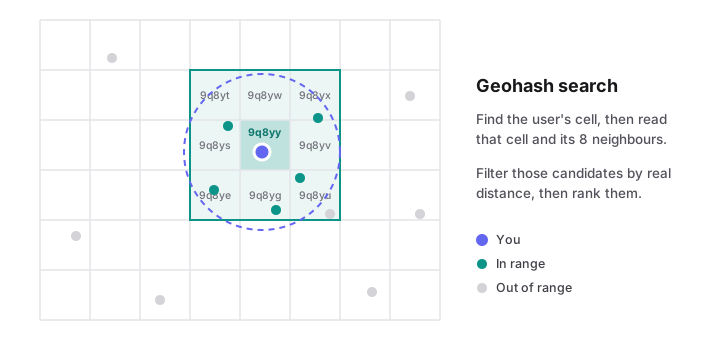
Geohash is a good default to explain. A 6-character geohash is a cell about 1.2 km by 0.6 km.
Searching#
- Pick a geohash precision based on the radius (bigger radius, shorter prefix).
- Compute the user's cell and its 8 neighbours. Searching only the user's own cell would miss a business just across the boundary.
- Fetch business IDs in those cells, compute the real distance, and drop those outside the radius.
- Rank by a blend of distance, rating and popularity, and return a page of results.
If too few results come back, widen the search by dropping one character of precision.
Architecture#
- Search service: stateless; reads the geo index and business cache.
- Geo index: a table like
(geohash, business_id)with an index ongeohash, or an in-memory quadtree rebuilt periodically. Replicated widely since it's read-only for searches. - Business service: handles owner edits, writes to the primary database, and triggers an index update.
Scaling#
- The geo index is small, so replicate rather than shard it: every search node can hold a full copy.
- Cache popular areas: downtown searches repeat constantly; cache results per geohash and filter set for a minute.
- Business details and reviews are much bigger than the index and can be sharded by business ID.
Ranking and filters#
Filters like "open now", price and cuisine are applied after the geo lookup on a few hundred candidates, which is cheap. Personalised ranking can run as a second pass over the filtered list.
Finished this walkthrough?
Mark it as read to track your progress in the list.